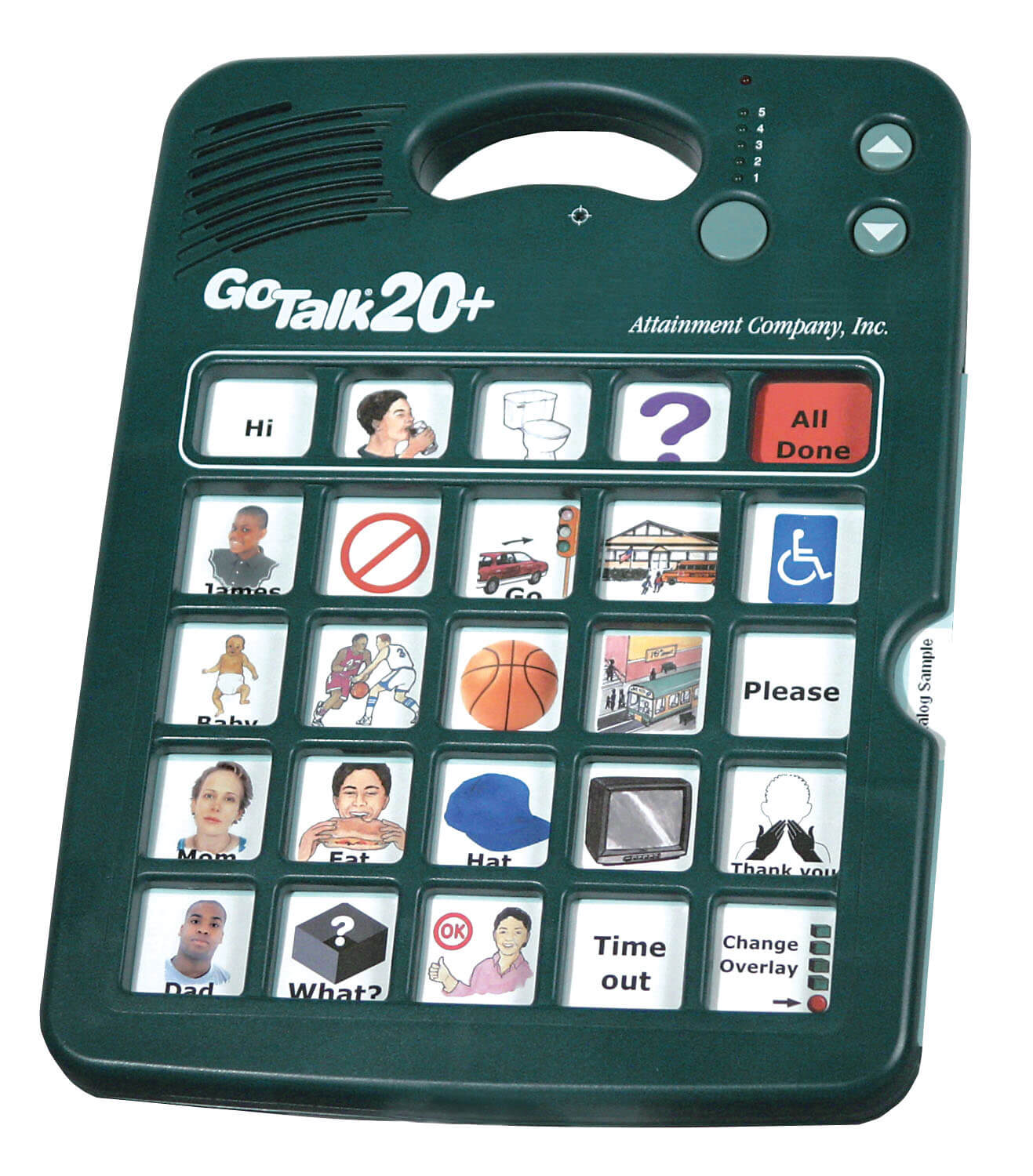
AAC devices range from simple picture boards ($30) to advanced speech-generating systems ($7,000+). SLPs recommend starting with low-tech options for assessment, then progressing to tablets with apps like Proloquo2Go ($250) or dedicated devices like GoTalk systems ($175–$570) based on individual motor, cognitive, and communication needs.
- Emerson College - Master's in Speech-Language Pathology online - Prepare to become an SLP in as few as 20 months. No GRE required. Scholarships available.
- Arizona State University - Online - Online Bachelor of Science in Speech and Hearing Science - Designed to prepare graduates to work in behavioral health settings or transition to graduate programs in speech-language pathology and audiology.
- Pepperdine University - Embark on a transformative professional and personal journey in the online Master of Science in Speech-Language Pathology program from Pepperdine University. Our program brings together rigorous academics, research-driven faculty teaching, and robust clinical experiences, all wrapped within our Christian mission to serve our communities and improve the lives of others.
- Aurora University - BS Communication Sciences and Disorders program - Discover how to transform lives by identifying and treating communication disorders for people of all ages. You’ll gain hands-on experience while fulfilling requirements toward graduate education.
- Arkansas State University - Dyslexia Certificate - Build upon your teaching expertise by adding a specialization in dyslexia with their Dyslexia Certificate online program.
- Eastern Oregon University - Master of Science in Education with a specialization in Dyslexia - Provides an advanced study of best practices and applications for PK–12 contexts with a specialization in Dyslexia.
- The University of West Alabama - Master of Education in Dyslexia Therapy - Enter an emerging field to support students with dyslexia and related reading challenges by earning your MEd in Dyslexia Therapy degree.
Augmentative and Alternative Communication (AAC) devices have transformed dramatically over the past decade. What once required expensive, specialized hardware now lives on tablets and smartphones. Today’s AAC technology is more affordable, more powerful, and more accessible than ever, giving speech-language pathologists an expanding toolkit to help patients communicate effectively.
As an SLP, you’ve likely encountered AAC during your graduate program and clinical experiences. But if you haven’t yet worked extensively with these systems, you probably have questions about which devices work best for different patients, how to match technology to individual needs, and where to even begin with assessment. The responsibility of finding the right AAC solution often falls to you, and your patients depend on your expertise to make the right choice.
This article provides educational information about AAC devices for speech-language pathology professionals and families. It is not medical advice. Consult a licensed SLP for device assessment and recommendations specific to individual communication needs.
What Are AAC Devices?
Augmentative and Alternative Communication (AAC) encompasses any method that supplements or replaces spoken language. AAC isn’t limited to electronic devices—it includes everything from simple communication boards and sign language to sophisticated speech-generating devices (SGDs) powered by artificial intelligence.
The term “augmentative” refers to communication methods that supplement existing speech, while “alternative” describes systems that completely replace verbal communication. Many individuals use AAC as a bridge to developing spoken language, while others rely on it as their primary communication method throughout their lives.
According to the American Speech-Language-Hearing Association (ASHA), AAC devices serve individuals with a wide range of conditions, including autism spectrum disorder, cerebral palsy, childhood apraxia of speech, traumatic brain injury, stroke, ALS, muscular dystrophy, and developmental language disorders. Research published in ASHA journals consistently demonstrates that AAC doesn’t inhibit speech development. Instead, AAC often facilitates verbal language by reducing communication frustration and providing a multimodal foundation for language learning.
Types of AAC Systems
AAC systems fall into three main categories based on their complexity and symbolic representation. Understanding these categories helps you match the right technology to your patient’s cognitive, motor, and communication abilities.
Single-Meaning Pictures (Direct Selection)
These systems represent the simplest form of AAC. Each picture or symbol corresponds to a single word or concept. Users select the image they want to communicate, and the device either displays or speaks that word. These systems don’t require literacy, although the pictures may need to be taught to the user.
Picture-based systems work well for individuals with cognitive impairments, young children just beginning to communicate, or anyone who struggles with abstract symbol representation. The main limitation is that extensive vocabularies require many pictures, which can make the system cumbersome to navigate.
Alphabet-Based Systems (Spelling)
Alphabet-based AAC requires users to spell out words using letters. This approach offers unlimited vocabulary potential since users can create any word they need. However, it demands literacy skills and can be slower than other methods, especially for users with motor impairments who need time to select each letter.
These systems work best for literate individuals who’ve lost the ability to speak due to conditions like ALS, stroke, or traumatic brain injury. They’re less appropriate for young children, individuals with intellectual disabilities, or anyone without established literacy skills.
Semantic Compaction (Icon Sequencing)
Semantic Compaction, also called Minspeak, uses sequences of multi-meaning icons to represent words. Users learn that pressing two or three specific icons in order generates a particular word or phrase. For example, the same apple icon might be part of different sequences: apple + sun could mean “breakfast,” while apple + person could mean “teacher.”
This approach offers the speed advantage of requiring fewer selections per word while maintaining a large vocabulary. The tradeoff is a steeper learning curve. Users must memorize icon sequences, which requires good memory and cognitive skills. Systems like PRC’s Unity and Saltillo’s WordPower use Semantic Compaction principles.
Many modern AAC devices combine all three approaches, letting users switch between picture selection, spelling, and icon sequences based on their skills and communication needs.
Top 10 AAC Devices for Speech Therapy
We’ve selected these devices based on clinical effectiveness, ease of use, affordability, and availability in 2025. This list spans all price points and complexity levels—from simple voice output devices for preschoolers to sophisticated SGDs for adults with progressive conditions. Devices are organized from simpler, lower-tech options to more complex, high-tech systems.
Note: Pricing listed reflects approximate 2025 retail costs and may vary by vendor, insurance coverage, and regional availability. Always verify current pricing with manufacturers or AAC suppliers.
| Device Category | Best For | Price Range | Tech Level |
|---|---|---|---|
| Low-Tech Communication Boards | Initial assessment, backup systems | $30–$200 | No-tech/Low-tech |
| Single-Message Devices | Young children, choice making | $175–$250 | Low-tech |
| Multi-Level Voice Output | School-age children, routine communication | $175–$570 | Mid-tech |
| Tablet-Based Apps | Dynamic communication, portable use | $150–$300 (plus tablet cost) | High-tech |
| Dedicated Speech-Generating Devices | Full-time AAC users, complex needs | $3,000–$15,000 | High-tech |
1. Big Talk Assistive Technology Communicator
Price: Approximately $215
Tech Level: Low-tech
Best For: Users with limited motor control, choice-making activities
The Big Talk features an extra-large, colorful button that activates with minimal pressure, making it ideal for users with significant motor impairments. A single message of up to 20 seconds can be recorded. The device also functions as an external switch for other assistive technology, extending its utility beyond communication.
Multiple Big Talk devices can be arranged to create choice-making opportunities or sequential communication systems. For example, one button might say “I’m hungry,” another “I need help,” and a third “I want to play.” This setup works well for users still developing early communication skills.
Why SLPs recommend it: Large target area accommodates motor limitations, versatile switch capabilities, and simple programming.
2. Pocket Go-Talk 5-Level Communication Device
Price: Approximately $190
Tech Level: Low-tech
Best For: Young children, on-the-go communication
This portable device fits easily in a hand or pocket and comes with a lanyard for wearing around the neck. It features six buttons with five message levels per button, allowing up to 30 pre-recorded messages. The loudspeaker makes it practical for use in public spaces like classrooms, playgrounds, and community settings.
The Pocket Go-Talk excels as an introduction to AAC for young children who need basic communication functions. Insert picture overlays that match the child’s environment and interests, then record corresponding words or phrases. The device’s durability withstands drops and bumps, making it practical for active preschoolers.
Why SLPs recommend it: Simple operation, excellent durability, affordable price point for families starting their AAC journey.
3. GoTalk 9+
Price: Approximately $175
Tech Level: Low-tech to Mid-tech
Best For: Budget-conscious families, classroom use
The GoTalk 9+ offers exceptional value at under $200. This lightweight, durable device provides 45-message capacity across five recording levels with nine minutes of total recording time. Users simply press message keys that correspond to pictures placed in the clear frame overlay.
Schools often purchase multiple GoTalk devices because of their affordability and reliability. They work well in group settings, can be easily customized for different activities or subjects, and don’t require charging or software updates. The device includes both recorded messages and core word buttons that remain constant across levels.
Why SLPs recommend it: Exceptional affordability, no technical troubleshooting needed, easy for staff to program and customize.
4. Enabling Devices Tactile Symbol Communicator
Price: Approximately $500
Tech Level: Mid-tech
Best For: Visually impaired users, individuals who benefit from tactile input
This specialized device addresses an often-overlooked AAC population: individuals who are blind or have significant visual impairments. Six removable tactile symbols allow users to feel and press buttons to relay pre-recorded messages. The device stores up to 36 messages across six levels, with six seconds of recording time per message.
The tactile symbols can be customized to represent different concepts through shape, texture, or other distinguishing features. This approach gives visually impaired AAC users the same communication independence that visual systems provide for sighted users.
Why SLPs recommend it: Addresses accessibility needs of blind and low-vision users, portable, durable design.
5. Proloquo2Go
Price: $249.99 (iOS app)
Tech Level: High-tech
Best For: Symbol-based communicators with motor skills for touchscreens
Proloquo2Go transformed AAC by bringing sophisticated communication software to the iPad at a fraction of traditional dedicated device costs. The app includes over 10,000 symbols, natural-sounding text-to-speech voices, and a research-based vocabulary organized by age and language development level.
What sets Proloquo2Go apart is its progressive language system. Users can start with basic core vocabulary layouts and advance to more complex vocabulary organizations as their skills develop. The app supports both direct selection and scanning access methods, accommodating users with different motor abilities.
Why SLPs recommend it: Comprehensive vocabulary, highly customizable, backed by research, and works on devices families already own.
6. TouchChat HD with WordPower
Price: $299.99 (iOS app)
Tech Level: High-tech
Best For: Users who benefit from Semantic Compaction
TouchChat pairs with the WordPower vocabulary system, which uses Semantic Compaction principles to create an extensive vocabulary with relatively few icon selections. Users learn icon sequences to generate words quickly, making conversation flow more naturally than spelling-based systems.
The app includes multiple vocabulary levels from beginning communicators to adult literacy users. It also offers Dropbox backup, multiple user profiles on one device, and the ability to share vocabulary files between users. The companion app for communication partners helps families and therapists understand the icon sequences.
Why SLPs recommend it: Grows with the user from childhood through adulthood, efficient communication once sequences are learned, strong support community.
7. LAMP Words for Life
Price: $299.99 (iOS app)
Tech Level: High-tech
Best For: Users who benefit from motor planning consistency
LAMP (Language Acquisition through Motor Planning) maintains consistent motor patterns for accessing vocabulary. Each word always appears in the same location, which helps users develop automatic motor patterns similar to how we develop muscle memory for typing. This approach particularly benefits individuals with apraxia or those who struggle with changing visual layouts.
The app features the Unity vocabulary system with research backing its effectiveness for language development. All vocabulary remains accessible without changing pages or navigating through multiple folders, which research suggests improves language learning and communication efficiency.
Why SLPs recommend it: Evidence-based approach, excellent for apraxia, promotes Motor Planning, strong research foundation.
8. CoughDrop
Price: $5–$10 per month subscription (after free trial)
Tech Level: High-tech
Best For: Users who need cross-device synchronization
CoughDrop takes a unique subscription approach to AAC, offering cloud-based vocabulary that syncs across multiple devices. Users can access their communication system on their iPad at school, smartphone on the go, and computer at home, with all vocabulary and customizations synchronized automatically.
The system includes pre-made boards for quick starts, plus the flexibility to create custom layouts. Boards can include symbols, photos, or text labels. The supervising account feature allows therapists and family members to make changes remotely and track communication data to monitor progress.
Why SLPs recommend it: Multi-device access, affordable monthly pricing, built-in data tracking, and family-friendly management tools.
9. TD Snap on Tobii Dynavox Devices
Price: $3,000–$8,000 (depending on device and features)
Tech Level: High-tech
Best For: Users with complex access needs, including eye gaze
TD Snap represents the evolution of dedicated speech-generating devices. Available on various Tobii Dynavox hardware options, it offers core word-based vocabulary with grammar support that helps users construct grammatically correct sentences. The software adapts as users develop language skills, starting with simple single-word communication and progressing to complex sentence structures.
Tobii devices accommodate multiple access methods, including direct touch, switch scanning, and eye gaze tracking. This flexibility makes them appropriate for users with significant motor impairments who can’t reliably use touchscreens. The rugged, medical-grade hardware withstands intensive daily use.
Why SLPs recommend it: Accommodates severe motor impairments, comprehensive vocabulary system, robust hardware built for full-time communication.
10. Lightwriter SL50
Price: Approximately $7,000
Tech Level: High-tech (alphabet-based)
Best For: Literate adults with progressive conditions
The Lightwriter remains a specialized tool for literate individuals who need text-based communication. Its dual-display screen allows users to type messages while maintaining face-to-face positioning with conversational partners. One screen faces the user, the other faces outward so the communication partner can read the message in real-time.
The latest SL50 model includes text-to-speech for situations where reading the screen isn’t practical, SMS texting capability through an inserted SIM card, environmental controls for home automation, and built-in alarms and reminders. These features make it more than just a communication device, serving as a comprehensive independence tool for individuals with conditions like ALS.
Why SLPs recommend it: Dual-display promotes natural conversation flow, alphabet-based for unlimited vocabulary, and additional features support independence.
How to Choose the Right AAC Device
Selecting an AAC device isn’t about finding the “best” system—it’s about finding the best match between the device’s features and your patient’s unique combination of abilities, needs, and goals. A comprehensive AAC assessment should consider multiple factors before making a recommendation.
Motor Skills and Access Method
Can your patient reliably point to or touch targets? How large do those targets need to be? Can they use direct selection, or do they need scanning access where options are presented one at a time?
Users with cerebral palsy, spinal muscular atrophy, or traumatic brain injury may have limited motor control that rules out devices requiring precise finger movements. Some patients can use standard touchscreens. Others need large buttons, switch access, eye gaze tracking, or head tracking. Match the device’s access options to the patient’s most reliable motor movement. Don’t choose a sophisticated tablet-based system if your patient can’t accurately touch symbols on a screen.
Cognitive and Language Abilities
What’s your patient’s cognitive level? Do they understand cause-and-effect relationships? Can they learn and remember symbol meanings or icon sequences?
Users with intellectual disabilities may need simple, concrete symbol systems with direct picture-to-word relationships. Users with intact cognition but language impairments might benefit from text-based or Semantic Compaction systems. Consider symbolic representation—some users need actual photographs of specific items (“my red cup”) before they can generalize to line drawings or abstract symbols representing the category (“cup”). Others immediately understand that a simple icon represents a concept and can work with abstract symbol systems.
Vision and Hearing
Visual and auditory abilities significantly impact AAC device selection. Users with low vision need high-contrast displays, larger symbols, or tactile systems.
Those who are deaf or hard of hearing need visual output rather than relying solely on speech output. Don’t overlook these sensory considerations, or you’ll recommend a device your patient can’t effectively use.
Communication Goals and Settings
Where will your patient primarily use AAC? A preschooler needs a device that works in a classroom, travels home on the bus, and survives sibling interactions. A business professional with ALS needs sophisticated messaging capabilities, including phone and email communication. A nursing home resident needs something caregivers can easily program and maintain.
What communication functions are priorities? Basic needs and wants? Social interaction? Academic participation? Employment-related communication? Different devices excel at different functions. A simple voice output device might meet basic needs but won’t support academic writing or social media interaction.
Trial Periods and Assessment
Never recommend an expensive AAC device without a trial period. Most manufacturers and AAC specialists offer equipment lending libraries or trial programs. Observe your patient using the device in natural environments over several weeks. What seems promising in a therapy room might prove impractical in real-world settings.
During trials, assess not just whether the patient can use the device, but whether they will use it. Does it fit into their daily routines? Do communication partners respond positively? Can family members and staff support its use? The best AAC system is the one that actually gets used consistently.
| Assessment Area | Key Questions | Impact on Device Selection |
|---|---|---|
| Motor Skills | Can they point, touch, scan, or use eye gaze? What’s their most reliable movement? | Determines access method (direct selection, scanning, eye gaze) |
| Cognition | Do they understand symbols? Can they learn sequences? What’s their memory capacity? | Affects vocabulary organization (pictures vs. spelling vs. Semantic Compaction) |
| Vision | Can they see standard screens? Need high contrast or large symbols? Require tactile input? | Influences display size, contrast settings, and whether tactile options are needed |
| Language Level | Single words? Simple phrases? Complex sentences? What’s their receptive language level? | Determines vocabulary complexity and grammar support features needed |
| Environment | Where will it be used? Who are communication partners? What’s the noise level? | Affects durability requirements, volume needs, and portability features |
Funding and Insurance for AAC Devices
Cost shouldn’t prevent individuals from accessing AAC, but navigating funding sources requires knowledge and persistence. Multiple options exist for financing AAC devices, each with different requirements and application processes.
Private Insurance Coverage
Many private insurance plans cover AAC devices classified as “durable medical equipment” or “speech-generating devices” when medically necessary. Coverage typically requires a prescription from a physician, comprehensive evaluation documentation from an SLP, and evidence that the device is medically necessary rather than for convenience or educational purposes.
Insurance companies usually cover dedicated SGDs more readily than tablets with communication apps. They may argue that tablets serve general purposes beyond communication, though advocacy efforts have improved coverage for tablet-based systems in recent years. Detailed documentation emphasizing the device’s medical necessity improves approval odds.
Medicare and Medicaid
Medicare covers speech-generating devices when medically necessary. Documentation must establish that the patient has a communication impairment significantly affecting their ability to perform daily activities, that the device will improve their communication, and that they’ve received appropriate training.
Medicaid coverage varies by state, but generally includes AAC devices for children and adults when medically necessary. Some states have specific AAC lending libraries or loaner programs that let patients try devices before purchase, increasing the likelihood of successful long-term use.
Note: Medicare and Medicaid coverage policies are periodically updated. Verify current criteria and documentation requirements with your regional office or consult with an AAC specialist familiar with insurance processes.
School District Funding
Under IDEA (Individuals with Disabilities Education Act), school districts must provide assistive technology, including AAC devices, when necessary for a student to receive a free appropriate public education. The device should be written into the student’s IEP (Individualized Education Program).
School-purchased AAC devices remain school property, traveling home only if the IEP specifies that home use is necessary for educational benefit. Some families pursue separate personal devices to ensure access outside school settings and during summer breaks.
Alternative Funding Sources
Multiple organizations provide AAC funding assistance:
- AAC Funding websites maintain databases of grants, foundations, and assistance programs specific to communication devices
- Service organizations like Lions Club, Rotary International, and Knights of Columbus sometimes fund AAC devices for local community members
- Crowdfunding platforms (GoFundMe, Indiegogo) help families raise funds directly from their communities
- AAC manufacturer programs offer payment plans, refurbished devices at reduced cost, or financial assistance programs
- State vocational rehabilitation programs fund AAC devices when necessary for employment
Documentation Requirements
Regardless of funding source, strong documentation increases approval likelihood. Your AAC evaluation report should include:
- A clear medical diagnosis explaining the communication impairment
- Current communication abilities and limitations
- Functional impact of the communication impairment on daily activities
- Description of assessment process, including devices trialed
- Specific device recommendation with justification for that particular model
- Evidence that the patient can learn to use the recommended device
- Training plan for the patient and communication partners
- Expected functional outcomes with the device
Partner with AAC specialists who have experience with funding documentation. Their expertise in navigating insurance requirements can be the difference between approval and denial.
Frequently Asked Questions
Will using an AAC device prevent my child from learning to talk?
No. Research published in ASHA journals and peer-reviewed studies consistently shows that AAC doesn’t inhibit speech development and often facilitates it. AAC reduces communication frustration, provides language models, and gives children a way to participate in conversations while their speech skills develop. Many children who start with AAC eventually transition to primarily verbal communication, while others continue using AAC alongside speech. Early AAC intervention supports rather than replaces speech development.
How long does it take to learn to use an AAC device?
Learning timelines vary dramatically based on the device complexity and the user’s abilities. Simple voice output devices might be mastered in days or weeks. Complex symbol-based systems with Semantic Compaction can take months to years for full proficiency. Most users begin communicating basic needs within the first few weeks, then gradually expand their vocabulary and efficiency. Consistent practice, supportive communication partners, and regular therapy sessions accelerate the learning process.
What’s the best AAC device for autism?
There’s no single “best” device for autism since individuals on the spectrum have vastly different communication abilities and needs. Many children with autism respond well to tablet-based apps like Proloquo2Go or TouchChat HD because of their visual strengths and interest in technology. Others benefit from simple voice output devices like GoTalk systems. The right device depends on the individual’s motor skills, cognitive level, language abilities, and personal preferences. A comprehensive AAC assessment by an SLP experienced in autism and communication is essential for making the right match.
Does insurance cover AAC devices and apps?
Many insurance plans cover AAC devices classified as durable medical equipment when medically necessary. Coverage typically requires a physician’s prescription, a comprehensive SLP evaluation, and documentation of medical necessity. Dedicated speech-generating devices generally receive better coverage than tablet-based apps, though advocacy efforts have improved tablet coverage in recent years. Medicare and Medicaid also provide AAC coverage when devices meet medical necessity criteria. School districts must provide AAC devices when necessary for educational access under IDEA. Always verify current coverage policies with your specific insurance provider, as criteria are periodically updated.
Can adults who’ve had strokes use AAC devices?
Yes. AAC devices serve adults with aphasia following stroke, helping them communicate during recovery and providing long-term support when speech doesn’t fully return. Literate adults often prefer alphabet-based systems like the Lightwriter or tablet apps that support typing and text-to-speech. Others benefit from picture-based systems if reading is impaired. AAC supports stroke survivors in expressing needs, maintaining relationships, and participating in therapy. Many individuals use AAC as a temporary bridge during recovery, while others incorporate it permanently into their communication strategies.
What’s the difference between low-tech and high-tech AAC?
Low-tech AAC includes communication boards, picture cards, and simple voice output devices with recorded messages. These systems don’t require charging, software updates, or technical troubleshooting. High-tech AAC includes tablets with communication apps and dedicated speech-generating devices with synthesized speech, dynamic displays, and complex vocabulary organizations. Low-tech options cost less and require minimal training but offer a limited vocabulary. High-tech systems provide extensive vocabularies and sophisticated features but cost more and require technical support. Many AAC users benefit from having both low-tech backup systems and high-tech primary devices.
Can I turn an iPad into an AAC device?
Yes. Multiple AAC apps transform iPads into sophisticated communication devices at a fraction of dedicated device costs. Popular apps include Proloquo2Go ($250), TouchChat HD with WordPower ($300), LAMP Words for Life ($300), and CoughDrop (subscription-based). These apps offer comprehensive vocabularies, customization options, and high-quality speech output. However, iPads lack the rugged durability of dedicated AAC devices and may tempt users with games and non-communication apps. For full-time AAC users, consider protective cases designed for AAC use and use iPad’s Guided Access feature to limit access to non-communication functions.
Key Takeaways
- AAC devices range from simple $30 communication boards to $15,000 dedicated speech-generating systems, with effective options available at every price point for different communication needs.
- Research published in ASHA journals confirms that AAC doesn’t prevent speech development and often facilitates verbal language by reducing frustration and providing multimodal language input.
- Device selection must match the individual’s motor abilities, cognitive level, vision, language skills, and communication environments rather than choosing the “most advanced” technology available.
- Tablet-based AAC apps like Proloquo2Go and TouchChat HD offer sophisticated communication at $150–$300, making high-quality AAC accessible to more families when paired with iPads they already own.
- Insurance, Medicaid, Medicare, and school districts provide AAC funding when devices are medically necessary, but approval requires comprehensive documentation from qualified SLPs.
- Successful AAC implementation requires training not just for users but for all communication partners, including family members, teachers, and caregivers who support daily communication.
- Emerson College - Master's in Speech-Language Pathology online - Prepare to become an SLP in as few as 20 months. No GRE required. Scholarships available.
- Arizona State University - Online - Online Bachelor of Science in Speech and Hearing Science - Designed to prepare graduates to work in behavioral health settings or transition to graduate programs in speech-language pathology and audiology.
- Pepperdine University - Embark on a transformative professional and personal journey in the online Master of Science in Speech-Language Pathology program from Pepperdine University. Our program brings together rigorous academics, research-driven faculty teaching, and robust clinical experiences, all wrapped within our Christian mission to serve our communities and improve the lives of others.
- Aurora University - BS Communication Sciences and Disorders program - Discover how to transform lives by identifying and treating communication disorders for people of all ages. You’ll gain hands-on experience while fulfilling requirements toward graduate education.
- Arkansas State University - Dyslexia Certificate - Build upon your teaching expertise by adding a specialization in dyslexia with their Dyslexia Certificate online program.
- Eastern Oregon University - Master of Science in Education with a specialization in Dyslexia - Provides an advanced study of best practices and applications for PK–12 contexts with a specialization in Dyslexia.
- The University of West Alabama - Master of Education in Dyslexia Therapy - Enter an emerging field to support students with dyslexia and related reading challenges by earning your MEd in Dyslexia Therapy degree.
Ready to Specialize in AAC?
AAC expertise opens rewarding career opportunities working with diverse populations. Learn more about becoming an AAC specialist and discover graduate programs that emphasize assistive technology and communication disorders.